Manage link types
The vocabulary is edited in Zotero's settings, in a pane the plugin registers. Field meanings and the default list are in link-types-reference.md.
Open the pane
- Open Zotero's settings window (Edit, then Settings).
- Select "Mindmaps" in the pane list on the left.
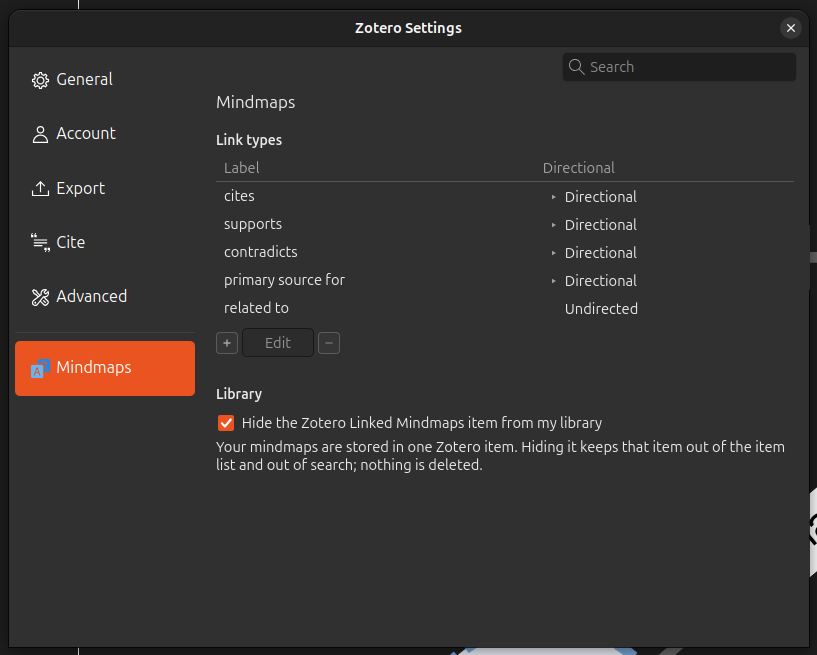
The pane holds two groups. "Link types" is a list with one row per type, headed "Label" and "Directional": the second column draws the line the graph will actually use for that type, dashed with an arrowhead for a directional type and solid for an undirected one, next to the word describing it. Add, edit and remove controls sit on a strip along the bottom of the list itself. The second group, "Library", holds the setting that hides the plugin's storage item.
Add a type
- Click the "+" on the strip below the list.
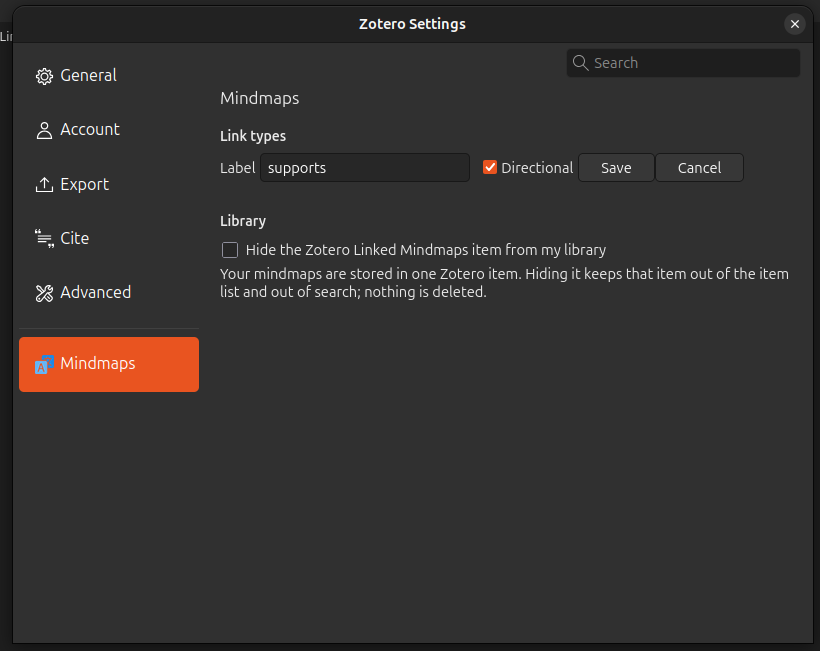
- Type the name in the "Label" field. This is what the Type dropdown and the graph's edge labels will show.
- Tick or untick "Directional", which is ticked by default. Tick it when links of this type read one way (A cites B), untick it when they read the same both ways (A related to B).
- Click "Save".
The list comes back with the new type selected. "Cancel" returns to the table without adding anything. Be aware that saving with a blank label does nothing at all: the button simply doesn't respond, and no message tells you why.
Edit a type
- Click the type's row. The whole row is clickable, and the selected one is highlighted.
- Click "Edit" on the strip below the list. It is disabled while nothing is selected.
- Change the "Label" field, the "Directional" checkbox, or both.
- Click "Save".
Renaming is safe. Existing links keep their type, because a link stores the type's id rather than its label, and the new label shows up on the graph and in the Mindmaps section the next time each one redraws.
Delete a type
- Click the type's row.
- Click the "−" on the strip below the list.
What happens next depends on how many links use the type. The plugin counts them across every mindmap in every library, since the vocabulary is shared by all of them.
No links use it: the type is deleted immediately, with no confirmation.
Some links use it: a dialog titled "Delete link type" asks
Delete this link type? 4 links use it and will show as "(unknown type)" there.
with the real count, and "link" in the singular when the count is one. Confirm and the type goes, while those links stay exactly where they are, reading "(unknown type)" on the graph and in the Mindmaps section alike. Cancel and nothing changes.
A mindmap couldn't be read: the count is unknown, and the dialog says
Could not check how many links use this type: its mindmap data could not be read. Delete anyway?
Read that as a warning that the number could be anything. It is not a hint that the type is unused.
Deletion can't be undone from the pane. Add a type back with the same label and it gets a new id, so the old links stay unknown. See link-types-explanation.md.